Free plugin from the Robo Gallery team
Robo Watermark.
Put your name on every photo before it leaves your site. Text or logo, one corner or tiled across the frame, and the clean originals are always one click away.
Get the download link.
Tell us your name and email, and the link appears right here. It works for 24 hours.
The same photo, before and after.
A text watermark at 55% opacity, rotated 25° and tiled across the image. The full-size original on the server stays clean; the gallery shows the watermarked sizes.

Before. The photo as you uploaded it. 
After. “© Anna Field Photography”, tiled. Anyone who saves the image takes your name with it.
What it does.
Text and image
Use a line of text, a logo, or both. Each has its own position (any corner or the center) and opacity. Text uses Roboto, with Cyrillic, in any size and color.
Rotation and tiling
Turn the mark at any angle and repeat it across the whole image, with the spacing you choose.
Choose what to protect
Only the thumbnails and gallery sizes, or the original file too. All images, or only the ones used in Robo Gallery galleries.
New uploads, automatically
Once it is set up, every new image gets the watermark as it is uploaded.
Existing images in bulk
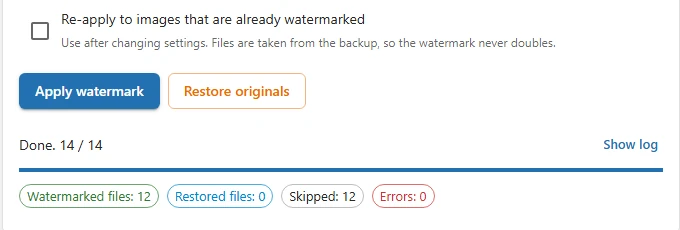
Apply the watermark to your whole Media Library with a progress bar and a stop button.
Originals kept safe
A clean copy of every file is saved first. Change the watermark as often as you like: it never doubles, and “Restore originals” brings back the untouched files.
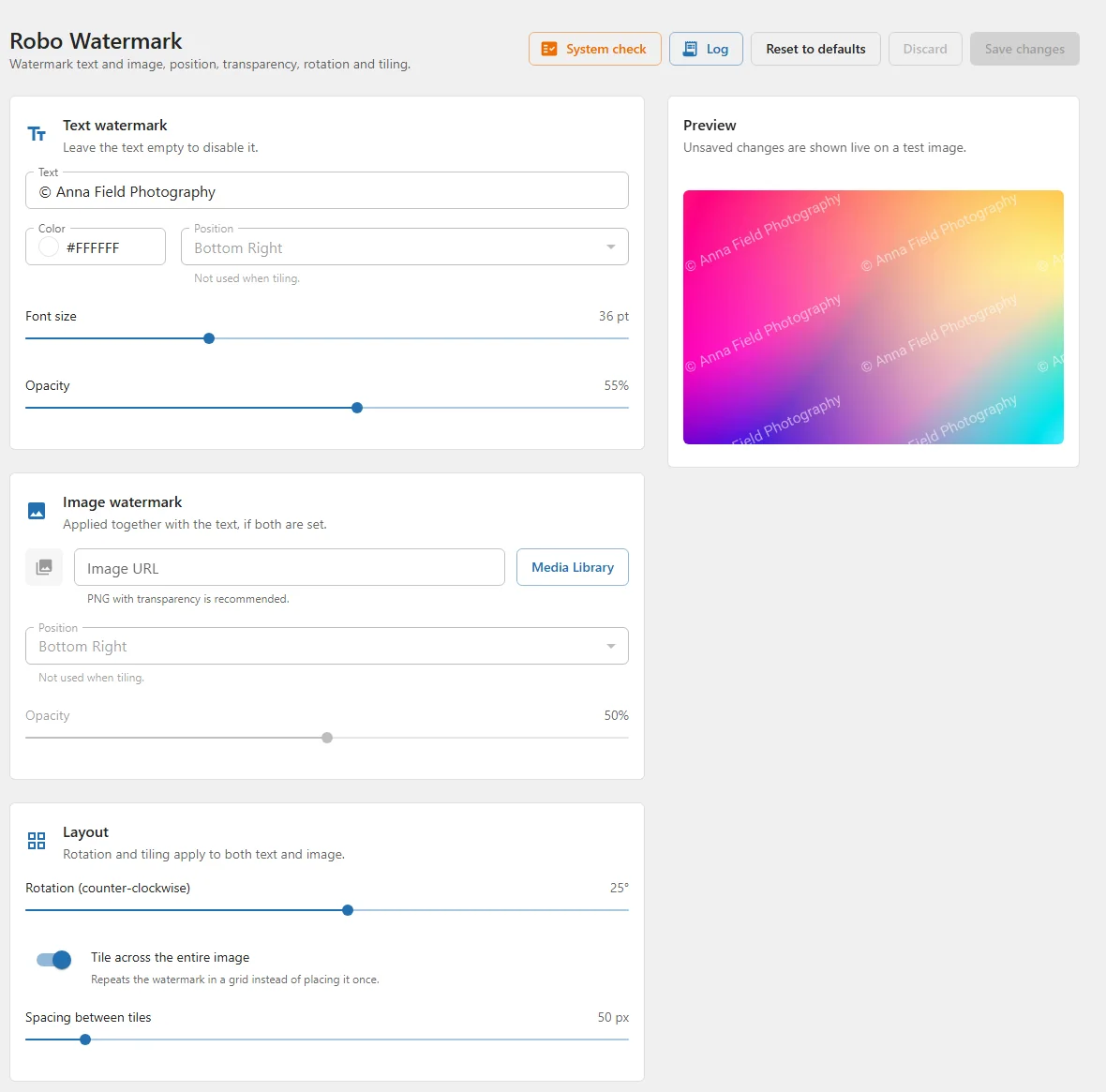
One page, a live preview.
See it before you save
The preview redraws the test image as you move a slider or change the text, so you pick the opacity and angle by eye.
Pick the logo from the Media Library
A transparent PNG works best; its transparency is kept.
A log of every file
Each watermarked, skipped or failed file is recorded, with an errors-only filter. Old entries are cleaned up weekly.
System check
One button checks the image libraries, formats, folder permissions, memory and whether the backups are hidden from the public.
Install it in a minute.
- Get the ZIP from the form on this page.
- In WordPress, open Plugins → Add New → Upload Plugin, choose the file and click Install Now, then Activate.
- Open Robo Watermark in the admin menu, set up the watermark and click Save changes.
- To mark the images you already have, click Apply watermark under “Existing images”.
Robo Watermark is on its way to the WordPress.org plugin directory. Until it is listed there, new versions are published on this page.
Requirements
- WordPress 5.9 or later and PHP 7.4 or later.
- The PHP GD extension, with FreeType for text watermarks.
- JPEG and PNG support in GD; GIF and WebP are optional.
- Write access to the uploads folder.
The System check button on the plugin page verifies all of this.
On nginx
Backups are kept in wp-content/uploads/robo-watermark-backup/. Apache is protected by an .htaccess file; on nginx, add this to the site configuration:
location ^~ /wp-content/uploads/robo-watermark-backup/ { deny all; }Questions.
Can I remove the watermark later?
Yes. Click Restore originals under “Existing images”. The clean copies saved before the first watermark replace the watermarked files.
I changed the settings. How do I update images that already have a watermark?
Click Apply watermark with Re-apply to images that are already watermarked checked. The new watermark is drawn on the clean backup copy, so the old one does not stay underneath.
Why did a new upload not get a watermark?
With “Robo Gallery images only” turned on, a freshly uploaded image is not in any gallery yet. Add it to a gallery, then run Apply watermark.
Do I need Robo Gallery?
No. Turn off “Robo Gallery images only” and the watermark goes on any image in the Media Library. With Robo Gallery, you can limit it to the images your galleries show.
Which images are skipped?
Images larger than 60 megapixels, and watermark images larger than 16 megapixels or 10 MB. The log lists every skipped file.
What happens when I uninstall the plugin?
The settings, the log and the processing marks are removed. The backups of your originals are kept on purpose, so the clean images are never lost. To put them back, click Restore originals before uninstalling, or reinstall the plugin and do it then.
What is new.
2.4.0
- New: System check for image libraries, image formats, folder permissions, memory and backup protection.
- Security: backups accept only image files inside the uploads folder.
- Security: limits for very large images and watermark images.
- Fix: an image processing error no longer stops the whole batch.
- The log is cleaned up weekly and keeps the latest 1,000 entries; the log viewer has pages, and the errors-only filter covers the whole log.
2.3.0
- New: settings, bulk processing, restore and the log on a single page.
- New: live preview of unsaved settings and a Media Library picker for the watermark image.
- New: backups of the originals and one-click restore; the watermark never doubles.
- New: Roboto font with Cyrillic support.
2.2.0
- Text and image watermarks can be used together.
- Image watermark opacity is applied and PNG transparency is kept.
- Fix: rotation direction and positions of rotated watermarks.
Protect the photos, then show them well.
Robo Watermark is free. Pair it with Robo Gallery for grids, albums, sliders and a lightbox that shows your work the way you shot it.